
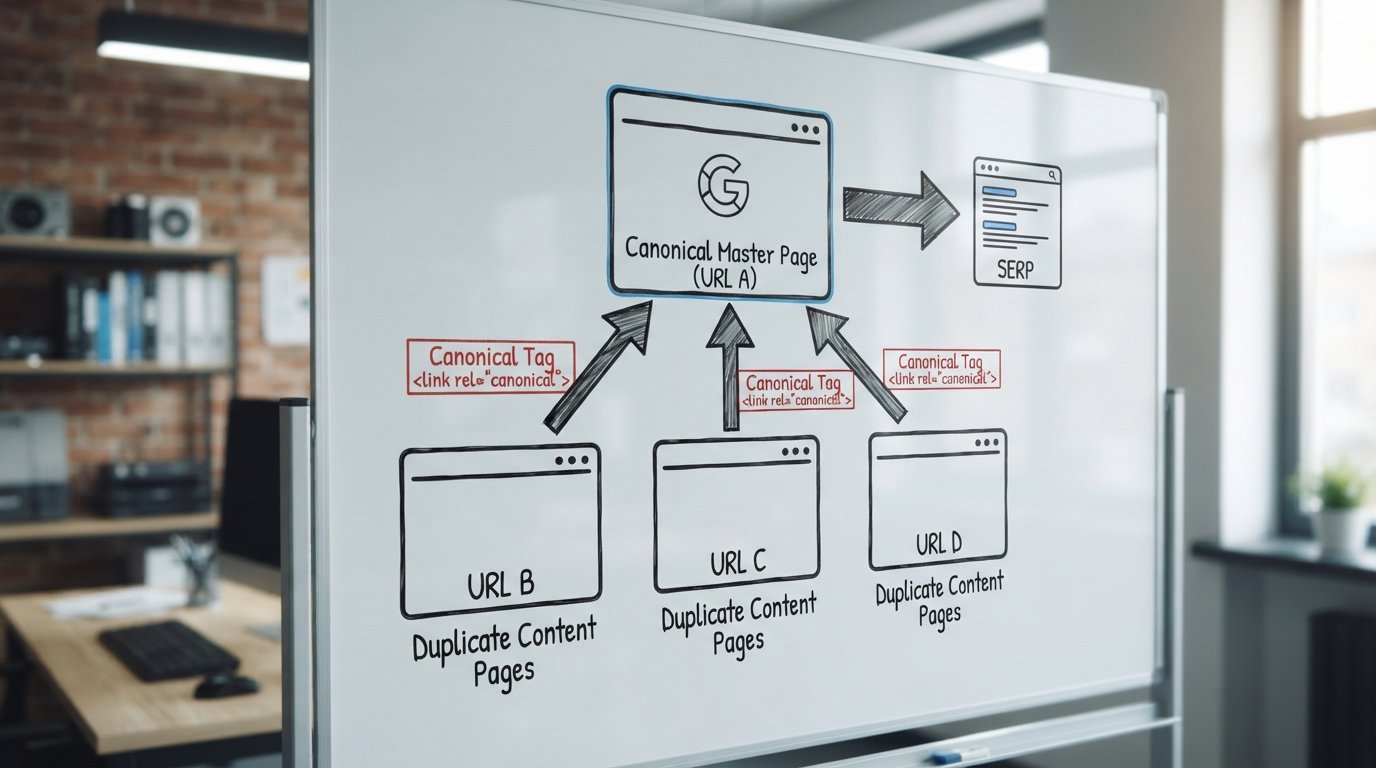
What is a canonical tag? It’s the line of HTML that tells Google which version of a page is the master copy when duplicate or near-duplicate content exists on your site. The word itself predates the web by nearly nine centuries: “canonical” was first recorded between 1150 and 1200, from the Latin canonicus, meaning “according to rule”. That’s fitting, because a canonical tag exists to enforce one rule: only one URL gets to count.
If you run an SEO programme for a B2B site with faceted navigation, UTM-tagged campaigns, or a blog syndicated across markets, canonical tags are how you keep Google from treating your own pages as competitors to each other.

Key Takeaways
- A canonical tag is a
<link rel="canonical">element in the HTML<head>that points to the preferred version of a page. - It’s a hint, not a directive. Google can, and sometimes does, ignore it if other signals disagree.
- Self-referencing canonicals (a page pointing to itself) should be the default on every indexable URL.
- Canonical tags don’t redirect users. Use a 301 redirect when you want visitors moved, not just search engines informed.
- Parameterised and UTM-tagged URLs should almost always canonicalise back to the clean, parameter-free URL.
- Conflicting signals (canonical vs sitemap vs internal links) are the single most common cause of Google choosing its own canonical instead of yours.
- Diagnosing canonical problems is done inside Google Search Console’s Page Indexing report, under “Duplicate, Google chose different canonical than user”.
For a wider look at how canonical management fits into a full technical programme, our SEO consulting service covers this alongside crawl budget, indexation and site architecture work.
What Is a Canonical Tag, Exactly, and Why Was It Created?
A canonical tag is a piece of metadata that lives in the <head> of an HTML document. It tells crawlers: “if you find other pages that look like this one, treat this URL as the original.”
Google, Bing and Yahoo introduced the standard jointly in 2009 to solve a genuine problem. E-commerce catalogues, session IDs, print-friendly pages and tracking parameters were producing millions of near-identical URLs, and search engines had no reliable way to know which one to index.
Without a canonical signal, duplicate pages compete against each other. Link authority gets split, content gets flagged as duplicate, and the version you actually want visible often isn’t the one that ranks.
The Exact HTML Syntax for a Canonical Tag
The syntax is short, and that’s the point. It should be simple enough that a developer can add it to a template without a second thought.
<head>
  <link rel="canonical" href="https://www.example.com/product/blue-widget" />
</head>
A few rules that matter more than they look:
- The
hrefmust be an absolute URL, including the protocol (https://) and domain, never a relative path. - Use the exact version your site serves, including or excluding
www, consistently. - Only one canonical tag per page. Two conflicting tags in the same document is a common template error we find during audits.
- Canonical tags can also be set via HTTP header, useful for PDFs and non-HTML files:
Link: <https://www.example.com/whitepaper.pdf>; rel="canonical"Canonical Tag vs 301 Redirect vs Noindex: When to Use Each
This is where most confusion sits, so it’s worth being precise. Each tool answers a different question.
| Tool | What it does | Use it when |
|---|---|---|
| Canonical tag | Consolidates indexing signals; both URLs stay live | You need both versions to exist (e.g. sorting parameters, mobile/desktop variants) |
| 301 redirect | Permanently sends users and crawlers to a new URL | The old URL should never be seen again (page moved, merged, or retired) |
| Noindex | Removes a page from the index entirely | The page should exist for users but never appear in results (thank-you pages, internal search results) |
A quick rule of thumb we give clients during SEO consulting sessions: if the URL should disappear forever, redirect it. If it needs to stay live but shouldn’t be indexed, noindex it. If it needs to stay live and indexed, but under a different URL’s identity, canonicalise it.
Self-Referencing Canonical Tags: Why Every Page Needs One
A self-referencing canonical is simply a page pointing its canonical tag at its own URL. It looks redundant, and technically it often is.
But it’s cheap insurance. It protects against parameter pollution, tracking scripts, or CDN caching accidentally creating variant URLs that dilute the original.
<!-- On https://www.example.com/blog/canonical-tags/ -->
<link rel="canonical" href="https://www.example.com/blog/canonical-tags/" />
We treat this as a default setting, not an exception. Every indexable template should output one automatically, without a developer needing to remember to add it manually.
Cross-Domain Canonical Tags Explained
A canonical tag doesn’t have to point within the same domain. Cross-domain canonicalisation tells Google that a URL on one domain is a duplicate of a URL on a completely different domain.
This comes up in a few recurring scenarios:
- Syndicated content, where a partner site republishes your article and canonicalises back to your original.
- Multi-brand organisations running near-identical product pages across separate domains.
- Staging or regional mirrors that shouldn’t compete with the primary market site.
<!-- On partner-site.com/republished-article/ -->
<link rel="canonical" href="https://www.example.com/original-article/" />
Google generally respects cross-domain canonicals well, provided the content is genuinely similar. It won’t honour a cross-domain canonical on pages with substantially different content, no matter what the tag says.
Canonical Tags with Parameterised, Faceted URLs and UTM Tracking Parameters
This is where canonical tags earn their keep for any team running paid campaigns, email, or affiliate links.
Every UTM-tagged URL you send in a newsletter or paid ad creates a technically unique address. Without canonical handling, you’re generating dozens of duplicate URLs pointing at the same page.
<!-- On https://www.example.com/pricing/?utm_source=newsletter&utm_campaign=q3 -->
<link rel="canonical" href="https://www.example.com/pricing/" />
Faceted navigation on catalogue or directory sites follows the same logic. Colour filters, sort orders and pagination parameters should canonicalise back to the clean category URL, unless that specific filtered view genuinely deserves its own indexed page.
Our data analysis work often starts here: reviewing which parameter combinations get organic traffic before deciding whether to canonicalise, noindex, or leave a faceted URL indexable in its own right. It’s a decision that needs evidence, not a blanket rule.

Why Google Treats the Canonical Tag as a Hint, Not a Directive
This is the part that trips people up most often. A canonical tag is a strong suggestion to Google, not an instruction it’s obliged to follow.
Google’s own documentation confirms this directly: canonical tags are one signal among several, alongside redirects, internal linking patterns, sitemap entries and duplicate content similarity. If those signals contradict your canonical tag, Google may select a different URL as canonical entirely, one you didn’t choose.
You’ll see this in Search Console as “Google chose different canonical than user”. It’s not a bug. It’s Google telling you your signals don’t agree with each other.
The fix is rarely the canonical tag itself. It’s usually the internal links, sitemap, or redirect chain pointing somewhere else entirely.
Common Canonical Tag Mistakes We See in Technical Audits
Most canonical problems fall into a short list of repeat offenders. Here’s what we flag most often during SEO consulting engagements.
1. Canonicalising to a Redirect Chain
Pointing a canonical tag at a URL that itself redirects (sometimes more than once) forces Google to follow the chain to figure out the final destination. Always canonicalise directly to the final, live URL.
2. Conflicting Canonical and Sitemap Signals
If your XML sitemap lists URL A, but URL A’s canonical tag points to URL B, you’ve sent two different instructions. Sitemaps should only ever contain canonical URLs.
3. Canonical Pointing at a Noindexed Page
This tells Google “the authoritative version of this page is a page we’ve told you not to index,” which is a contradiction Google has no clean way to resolve. Both signals lose credibility as a result.
4. Canonicals Injected by JavaScript
If your canonical tag is added client-side rather than present in the initial HTML response, Google has to render the page fully before it sees it, and rendering isn’t guaranteed to happen on every crawl. Server-side rendering of the canonical tag is far more reliable.
5. Paginated Series Mishandling
A common error is canonicalising every page in a paginated series (page 2, page 3, page 4) back to page 1. This effectively tells Google those later pages don’t exist, which can remove genuinely unique products or articles from the index. Each page in a series should self-canonicalise.
Diagnosing Canonical Issues in Google Search Console’s Page Indexing Report
Search Console’s Page Indexing report (under Indexing > Pages) is where canonical problems surface first. Look specifically for these statuses:
- “Duplicate, Google chose different canonical than user”, the clearest sign your signals disagree.
- “Alternate page with proper canonical tag”, which is healthy and expected, not an error.
- “Duplicate without user-selected canonical”, meaning no canonical tag exists at all and Google picked one for you.
Click into the URL Inspection tool for any affected page and compare the “User-declared canonical” field against “Google-selected canonical”. When they differ, that’s your starting point for investigation.
This is exactly the kind of pattern-spotting our web analytics work is built around: pulling indexing data alongside organic traffic to work out which canonical conflicts actually cost visibility, and which are cosmetic.
Canonical Tag Implementation Checklist
- Confirm every indexable template outputs a self-referencing canonical by default.
- Audit parameterised URLs (UTM tags, session IDs, sort/filter parameters) and canonicalise them to the clean URL.
- Check that sitemap URLs match declared canonical URLs exactly, with no mismatches.
- Verify canonical tags are present in the raw server-side HTML, not injected only by JavaScript.
- Ensure canonicals never point at a redirecting URL, a redirect chain, or a noindexed page.
- Confirm paginated series (page 2, 3, 4…) self-canonicalise rather than pointing back to page 1.
- Cross-check Search Console’s Page Indexing report monthly for “Google chose different canonical” flags.

How AI, LLM Search and AI SEO Change the Canonical Conversation
Canonical tags aren’t just a Google-classic-search concern anymore. As AI-generated answers and LLM-powered search summaries pull directly from web content, having one clearly authoritative version of a page matters for a new reason: attribution.
When an AI system summarises your pricing page, your guide, or your product spec, it’s more likely to cite and link to the canonical version if your signals are clean. Messy, duplicated URLs make it harder for any system, human-built crawler or AI SEO pipeline, to know which page deserves the citation.
This is increasingly part of how we approach martech stacks for clients: treating canonical hygiene as foundational data-analysis work that supports both classic organic visibility and newer AI-driven discovery. If your data analysis and content teams aren’t already looking at this together, 2026 is a reasonable point to start.
Conclusion: What Is a Canonical Tag Worth to Your Site?
What is a canonical tag, in practical terms? It’s one of the cheapest, most effective technical fixes available for stopping duplicate content from splitting your visibility.
Get the syntax right, keep your signals consistent across sitemaps, redirects and internal links, and check the Page Indexing report regularly. That combination solves the vast majority of canonical problems we see in audits.
If canonical conflicts, faceted navigation, or UTM sprawl are already showing up in your indexing reports, our SEO and analytics services are built to sort exactly this kind of technical detail out properly. Feel free to get in touch if you’d like a second pair of eyes on yours.
Frequently Asked Questions
What is a canonical tag and why does my site need one?
A canonical tag is an HTML element that tells search engines which URL is the authoritative version when duplicate or similar pages exist. Sites need them because duplicate URLs (from parameters, tracking tags, or variants) otherwise split ranking signals across multiple pages instead of consolidating them into one.
Is a canonical tag the same thing as a 301 redirect?
No. A canonical tag lets both URLs stay live while telling search engines which one to index, while a 301 redirect permanently sends users and crawlers to a new URL and removes the old one from circulation. Use a redirect when the old page should disappear entirely, and a canonical tag when both versions need to keep existing.
Can a canonical tag point to a page on a different domain?
Yes, this is called a cross-domain canonical, and Google generally honours it when the content on both pages is genuinely similar or identical. It’s commonly used for syndicated content, multi-brand sites, or regional mirrors that shouldn’t compete against the primary domain.
Does Google always follow the canonical tag I set?
Not always. Google treats the canonical tag as a hint rather than a directive, and if other signals like internal links, redirects, or sitemap entries disagree, Google may select a different URL as canonical. This shows up in Search Console as “Google chose different canonical than user”.
What happens if a page has no canonical tag at all?
Without a declared canonical tag, Google will select one on its own based on other signals, which may not match the version you actually wanted indexed. Adding a self-referencing canonical to every page removes this guesswork entirely.
Should UTM tracking parameters have their own canonical tag?
Yes, any URL with UTM tracking parameters should canonicalise to the clean, parameter-free version of that page. Otherwise every campaign link you send creates a technically duplicate URL competing with the original.
Are canonical tags still worth setting up properly in 2026, with AI and LLM search growing?
Yes, arguably more so. As AI SEO and LLM-powered search summaries increasingly pull and cite web content directly, clean canonical signals help ensure the right version of your page gets the citation and traffic, rather than a duplicate or parameterised copy.

Founder of MarTech Stack. SEO, analytics and marketing automation.
LinkedIn