

In June 2026, only 8.7% of the top 1,000 websites publish an llms.txt (or llms-full.txt) file. If you are a B2B marketer or a web analytics lead, that gap is where your next “data to action” win can start, and an llms.txt generator is the fastest way to get moving without turning it into a months-long project.

Key Takeaways
SEO and web analytics teams often ask the same questions:
- “What’s an llms.txt generator?” A tool that turns your site URL inventory into the Markdown spec you publish at
/llms.txtand sometimes/llms-full.txt. - “Is it the same thing as robots.txt?” No.
robots.txtis crawl control, while llms.txt is a content map intended for LLM ingestion, written in a specific Markdown structure. - “Should we do this in 2026?” If you manage martech, AI and data analysis workflows, it is worth piloting carefully, because adoption remains limited but the file is easy to maintain with automation.
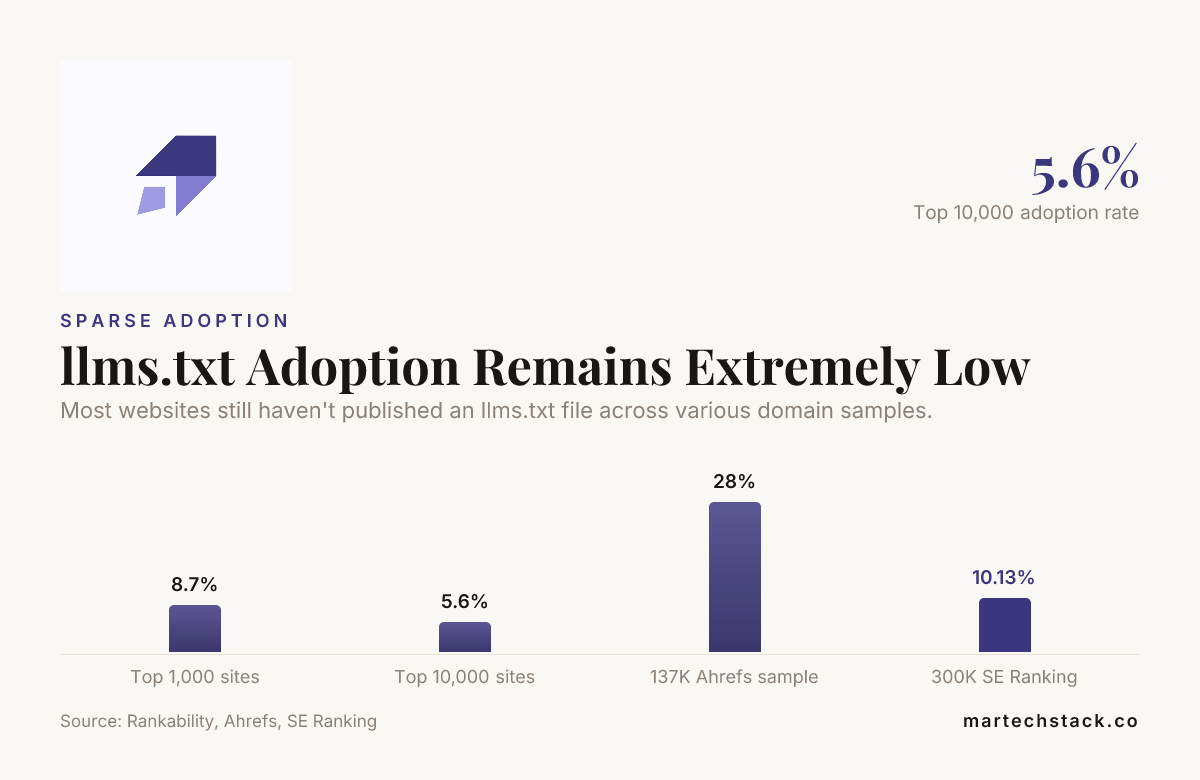
Most websites still haven’t published an llms.txt file across various domain samples.
What an llms.txt file is (and what an llms.txt generator outputs)
An llms.txt generator creates two files you place at the root of your website: /llms.txt and, optionally, /llms-full.txt.
Think of llms.txt as a compact, spec-style content map for LLMs. It is not a robots rule and it is not an XML sitemap. It is written in Markdown, so it is readable and structured, and it is designed to be easy for an LLM to interpret as “here are the pages that matter.”
Most generators follow a similar workflow:
- Collect candidate URLs from your CMS and/or sitemaps.
- Rank or filter pages based on inclusion rules you set (often “core pages first”).
- Render a Markdown file that matches the llms.txt spec structure.
- Deploy it at
https://yourdomain.com/llms.txt.
Where our martech instincts kick in is keeping the output tied to your real content priorities. If your content is strong but your inventory is messy, you do not need “more pages.” You need “clean pages, clearly labeled.” That is exactly what a good llms.txt generator should do.
The Markdown spec and file structure you should generate
There are two practical goals when you publish an LLM-facing page inventory:
- Machine clarity (format that tools can parse reliably).
- Human sanity (you can open it and immediately see what it contains).
In most implementations, the generator produces Markdown with a predictable hierarchy, usually including:
- Metadata blocks (what the file is, and sometimes site-level context).
- Groups or sections (for example, “Overview,” “Solutions,” “Company,” “Docs,” depending on your brand).
- Per-page entries with URL plus short descriptions.
- Optional additions for
llms-full.txt, where you can include more URLs and possibly more metadata.
If you want the fastest path to correct structure, start with an established quickstart such as the one published at llms-txt.io, which shows how generator logic maps into the deployed files.
Also, do not treat this as “fire and forget.” Your generator settings decide what appears, and your content strategy decides whether that list stays aligned as you publish new pages or retire old ones.

Concrete example: a complete llms.txt file for a B2B marketing site
Below is a practical example you can use as a starting point. Adjust the sections and descriptions to match your real pages. This is exactly the kind of output an llms.txt generator aims to produce, with clean formatting and page-level clarity.
Example file content (place at
/llms.txt):
# llms.txt
# Purpose: Provide a concise, LLM-friendly map of high-value pages.

## Company
- https://martechstack.co/our-story/
  Description: Our Story, values, and how we deliver measurable digital performance through data-driven strategies.

- https://martechstack.co/contact-us/
  Description: Contact form and consultation request details for marketing and analytics teams.

## Services
- https://martechstack.co/our-services/
  Description: Overview of our SEO, data analysis, and digital web analytics services.

- https://martechstack.co/our-services/seo-consulting/
  Description: SEO consulting services including audits, technical fixes, and implementation guidance.

- https://martechstack.co/our-services/digital-web-analytics/
  Description: Digital web analytics services, measurement frameworks, dashboards, and funnel insights.

## Data analysis
- https://martechstack.co/our-services/data-analysis/
  Description: Data analysis offering focused on extracting and interpreting data to support decision-making.
Notes we recommend you follow:
- Keep descriptions short, specific, and consistent in voice.
- Include pages that support your buying journey and your real martech workflows.
- Prefer stable, canonical URLs. Avoid query-string heavy links.
llms.txt generator options in 2026: manual, CMS plugins, and dedicated tools
You have three realistic paths, and in most teams the best choice is “automation with oversight.” Here are the options we see working best for B2B teams in 2026.
1) Manual generation (only if your site inventory is small)
If you have a handful of core pages and you change them rarely, you can manually write /llms.txt. The risk is drift. Over time, your list gets out of date, and what you publish stops matching reality.
If you go manual, we recommend you:
- Make the file part of your release checklist.
- Version-control the Markdown content.
- Run a quick validation after each site update.
2) CMS plugins (fast for WordPress teams)
If you run WordPress, plugins are usually the quickest route to consistent formatting. Two are worth a look:
-
LLMs.txt and LLMs-Full.txt Generator
What it does: Generatesllms.txtandllms-full.txtat your site root, with options to include or exclude post types and metadata. -
aiready-llms-txt-generator
Why it matters: Another WordPress route to keep the output aligned with your CMS structure.
When you evaluate plugins, look for the parts that reduce rework:
- Per-post-type inclusion rules
- Whether it updates automatically or needs a manual refresh
- Control over which metadata appears in
llms-full.txt
3) Dedicated generator tools (best for speed and consistency)
Dedicated tools can be ideal when you want a clean output without building a pipeline. One option, llmstxtgen.com, focuses specifically on generating /llms.txt and /llms-full.txt from a public URL.
It works like this:
- You enter a public URL.
- It discovers up to 20 pages.
- It outputs
/llms.txtand/llms-full.txtready to deploy.
For teams that care about governance, this is a nice starting point because “discover up to 20 pages” encourages you to focus on the pages that actually matter, instead of dumping your entire site into one file.
What to include and how to prioritize pages
This is where a generator either helps you or wastes your time. A generator can output a perfectly formatted file that still does not help your team, because the inputs were wrong.
Here is the prioritization logic we recommend for B2B marketing and web analytics teams:
Start with pages that explain your offer in plain language
- Homepage (short value statement and positioning)
- Core services pages (clear problem, clear solution)
- Industry or capability pages that match how buyers research
Add supporting pages buyers use to validate
- About and credibility pages
- Contact and consultation pages
- Any proof pages your team trusts, like case studies or partner pages (if you have them)
Be careful with “everything pages”
If your generator is set to include lots of blog and category URLs, you can end up with a noisy file. Noise reduces usefulness. If your goal is grounding, keep it focused.
Also, align the file with your commercial reality. If your “data analysis” service page drives leads, include it. If your “lab notes” blog category does not drive anything measurable, keep it out of /llms.txt and consider adding it only to /llms-full.txt if you truly need wider coverage.
Where llms.txt actually helps, and where impact is still unproven
We want you to go into this with open eyes. Adoption remains limited, and the evidence that this changes measurable outcomes is still thin.
What we do know from industry discussion is that direct effects are not consistently observed yet. One published takeaway is that llms.txt doesn’t seem to directly impact AI citation frequency, at least not yet. That means you should treat llms.txt as a practical part of your AI data readiness, not a guaranteed visibility lever.
So where does it help today?
- Operational clarity: you get a single file that documents your key pages for LLM ingestion.
- Governance: you control which URLs are included, and you can update it alongside content releases.
- Consistency: a generator keeps formatting and descriptions aligned across time.
Where impact is still unproven:
- Outcome attribution: it is hard to connect a specific file to business metrics without disciplined testing.
- Page-level lift: you may see no obvious difference in engagement, because adoption is low and requests are often dominated by bots.
That is why your validation plan matters. If you want real results, focus on verification you can measure in logs and operational checks, not just assumptions.

How to validate, deploy, and maintain llms.txt
Generating the file is the easy part. Keeping it correct is where your team earns the right to keep investing.
Validation checklist you can run today
- Confirm it resolves: open
https://yourdomain.com/llms.txtin a browser and ensure it returns200. - Confirm no redirects: avoid chains that complicate fetching.
- Confirm formatting: open the Markdown and verify headings and URL lists look right.
- Confirm content relevance: scan the included URLs and descriptions, remove anything outdated.
- Confirm it is publicly accessible: no auth walls, no IP allowlists, no accidental blocking.
Use server logs to measure real fetch behavior
In 2026, the easiest evidence is often your own logs. You want to answer two questions:
- Are
/llms.txtand/llms-full.txtbeing fetched? - Who is fetching?
Why this matters for web analytics and data analysis workflows: even when adoption is low, you can still validate that agents can access what you publish.
Also, make it part of your routine checks. When your team ships new services pages or retires old ones, update the generator inputs so the inventory stays aligned.
Maintenance cadence that works
- Monthly: quick scan for broken URLs, outdated descriptions, and missing new pages.
- After major site changes: regenerate and redeploy immediately.
- Quarterly: review prioritization rules for what belongs in
/llms.txtvs/llms-full.txt.
If you want a clean partner to help you keep the data-driven parts tidy, we work across SEO consulting, web analytics, and data analysis, so the file stays consistent with the way your site actually performs. You can start with our overview on SEO and analytics services.
Using llms.txt generator outputs alongside your analytics stack
An LLM-facing inventory file is one small artifact. It is not a replacement for measurement, but it fits into a bigger system, especially if your team manages AI, AI SEO and martech programs.
Here is a practical way to integrate it without overcomplicating:
- Keep it as a controlled deliverable: treat
/llms.txtas a release item managed by content owners. - Track access events: monitor server logs for fetches to
/llms.txtand/llms-full.txt. - Correlate with content changes: when you update page descriptions or restructure services, regenerate and observe behavior changes in a fixed window.
- Use it to improve your content mapping: if your descriptions are vague, your lead team usually already knows. Fixing them improves clarity everywhere.
And yes, we still see teams connect this to their AI search experiments, even while evidence of direct ranking changes remains limited. That is a reasonable stance in 2026, as long as your validation plan stays evidence-based.
If you want the generator to align with your services, start by mapping what buyers actually need. For example, our SEO consulting services page reflects how we package audits and implementation guidance. That kind of wording translates better into llms.txt descriptions than a generic “we do SEO.”
Real-world generator setup examples you can copy
Below are three setup patterns. Pick one based on your maturity, then adjust.
Pattern A: “Core pages only” (recommended pilot)
/llms.txtincludes homepage, company, 3 to 8 service pages, and contact./llms-full.txtexpands into supporting pages and deeper lists (optional).- Descriptions stay short, 1 to 2 lines each.
Pattern B: “Service depth” (for product-like B2B offers)
/llms.txtincludes each service with a clean explanation and the pages users compare./llms-full.txtincludes sub-pages and category pages where your content is consistently relevant.
Pattern C: “CMS-driven categories” (only if your CMS content is tidy)
- Include only specific post types and categories with stable structure.
- Exclude thin pages, tags, or low-value archives.
If you use WordPress and want automated generation, the LLMs.txt and LLMs-Full.txt Generator plugin is designed for exactly this kind of selection through inclusion rules and metadata options.

About tools and costs: what to expect when you choose an llms.txt generator
Costs depend on how you implement. Some generators are free or no-signup. Others add pro features like API access or deeper control.
For reference, the paid tiers on one WordPress plugin look like this:
- LLMs Full TXT Generator Pro Solo: €4.90
- LLMs Full TXT Generator Pro Business: €9.90
- LLMs Full TXT Generator Agency: €19.90
If you are just starting in 2026, start simple, then pay only when you can prove value in maintenance time saved or fewer formatting errors.
For a quick deployment path without signups, llmstxtgen.com is free and requires no account, and it focuses on generating llms.txt and llms-full.txt from a public URL.
FAQ
What is an llms.txt generator and do I really need one in 2026?
An llms.txt generator creates /llms.txt (and sometimes /llms-full.txt) in a Markdown structure meant for LLM ingestion. In 2026, you still do not need it, but it saves time and reduces formatting mistakes, especially for teams managing martech, web analytics, and data analysis workflows.
Is llms.txt the same as robots.txt or an XML sitemap?
No. robots.txt controls crawler access, and XML sitemaps are for URL discovery. An llms.txt generator produces a different file type, written as a spec-style Markdown page map intended for LLM consumption.
What should I include in /llms.txt so it actually helps our AI SEO efforts?
Include a focused set of high-value pages, usually homepage, key service pages, company or about, and contact. A good llms.txt generator should let you prioritize URLs and write descriptions that match how your buyers research.
Does publishing llms.txt improve citations or measurable performance right away?
Evidence is still thin. One published takeaway is that llms.txt “doesn’t seem to directly impact AI citation frequency, at least not yet.” That is why we recommend validating access through logs and measuring behavior instead of expecting immediate business lift.
How do I validate that my llms.txt generator output is correct?
Open the file in a browser, confirm you get a 200, check for redirects, and scan the Markdown for obvious formatting issues. Then confirm it is accessible from your production environment and monitor server logs for fetches to /llms.txt.
Where should I start if we want to generate llms.txt with WordPress?
Start with a WordPress plugin that generates both llms.txt and llms-full.txt, like LLMs.txt and LLMs-Full.txt Generator. Set inclusion rules so you only include the pages that matter for your martech and web analytics goals.
Conclusion
An llms.txt generator helps you ship a clean, spec-style /llms.txt (and optionally /llms-full.txt) without turning your AI search work into a manual headache. But be honest: in 2026 adoption is still limited and measurable impact remains unproven. Our practical advice is to pilot with a focused page list, validate with browser checks and server logs, then maintain it alongside your SEO and data analysis cadence. That way you can measure what the file is actually doing rather than assuming.

Founder of MarTech Stack. SEO, analytics and marketing automation.
LinkedIn