
Server side tagging has moved from “nice to have” to a serious conversation in almost every analytics roadmap we build with clients this year. Consider this: more than 40% of sessions in tech-heavy markets are currently invisible to standard client-side GTM tags, blocked outright by ad blockers and Safari’s Intelligent Tracking Prevention before a single pixel fires.
That’s not a rounding error. That’s nearly half your funnel disappearing from your reports, and it’s exactly why server-side tagging deserves an honest look, not a hype cycle.

Key Takeaways
| Question | Straight Answer |
|---|---|
| What is server-side tagging? | A setup where tags fire from a server you control (a tagging server) instead of the visitor’s browser, using a server-side Google Tag Manager container to process and forward events. |
| Does it actually fix data accuracy problems? | Yes, largely. It routes around ad blockers and reduces the impact of cookie lifetime ITP restrictions, but it doesn’t magically recover 100% of lost data. |
| Will it speed up my site? | Usually, yes. Fewer third-party scripts loading in the browser means real gains in page speed tracking performance, though results vary by site. |
| Is server-side tagging a way around consent requirements? | No. It changes where data is processed, not whether you need consent. Treat any vendor who tells you otherwise with suspicion. |
| What does it cost? | Hosting fees plus real engineering time, both for setup and ongoing maintenance. It’s rarely a “set it and forget it” project. |
| Who should invest first? | Mid-to-large sites with meaningful ad spend and a team that can support the added technical layer. Read our Technical SEO & Data Integrity Audit Checklist before you commit. |
| How does it relate to attribution accuracy? | Cleaner, first-party data collection feeds directly into better attribution models. See our take on why default channel grouping sabotages attribution. |
What Is Server-Side Tagging, Really?
Let’s clear up the confusion first. Server side tagging means your tags no longer fire directly from the visitor’s browser to every ad and analytics vendor at once.
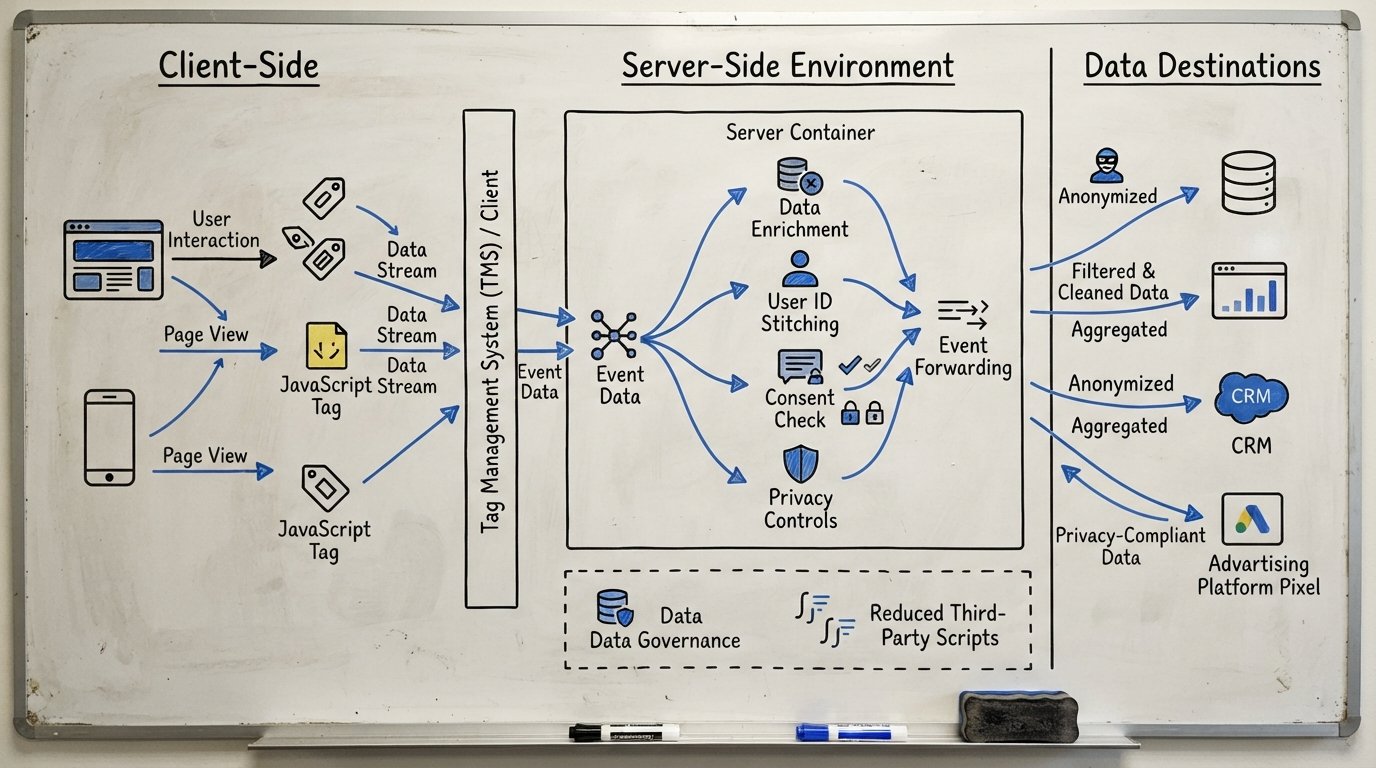
Instead, the browser sends one request to a tagging server you control, typically hosted on your own cloud infrastructure. That tagging server, running a server-side Google Tag Manager container, then forwards the data on to GA4, ad platforms, and other destinations.
Three pieces make up the architecture:
- Server GTM container: the logic layer, configured much like a regular GTM container, but running on infrastructure you own.
- The tagging server itself: usually a Google Cloud Run instance or similar, receiving and routing events.
- First-party data collection: events pass through your own domain rather than a bundle of third-party subdomains, which is what gives server side GTM its privacy and durability advantages.
This is not a plugin you install. It’s infrastructure, and it needs to be treated that way from day one.
Client-Side vs Server-Side Tracking: What Actually Changes
In a standard client-side vs server-side tracking comparison, the difference comes down to where the work happens.
Client-side tracking asks the browser to load a script for every vendor: GA4, a couple of ad pixels, maybe a heatmap tool. Each one is a separate request, each one is a separate point of failure, and each one is visible to browser extensions and privacy tools looking for exactly that pattern.
Server-side tracking collapses that into one first-party request. The browser talks to your domain. Your tagging server does the rest.
The practical result of this shift in client-side vs server-side tracking isn’t philosophical. It shows up directly in your GA4 numbers, your page speed reports, and your ad platform’s conversion counts.

The Data Accuracy Problem Server-Side Tagging Solves
Here’s where server-side tagging earns its keep. Two forces are quietly eating your analytics data right now: ad blockers and browser privacy restrictions.
Safari’s ITP and similar mechanisms in other browsers limit how long a first-party cookie set by JavaScript can survive, sometimes to just seven days. That’s the cookie lifetime ITP problem in a nutshell, and it wrecks your ability to measure returning visitors or long sales cycles.
Server-side tagging sets that same cookie from the server response instead of client-side JavaScript. Browsers generally treat server-set cookies more generously, which is why teams report first-party cookie lifetime extending up to 3x longer once they move the setting logic server-side.
That gap is not a small hole to patch. It’s a structural problem with how client-side tracking was designed a decade ago, and it’s the core reason data accuracy conversations keep circling back to server-side architecture.
Page Speed Tracking: Why Fewer Third-Party Scripts Win
Every third-party script your page loads is a request, a DNS lookup, and a chunk of JavaScript competing for the browser’s attention. Consolidate ten tags into one server-side connection, and the browser has a lot less work to do.
Industry case studies point to page-load improvements of up to 5.6 seconds after moving to server-side tagging, and Google Marketing Platform data shows retail sites gaining roughly 10% in average order value for every 0.1 second of mobile speed improvement.
Page speed tracking isn’t just a vanity metric here. It’s directly tied to conversion rate, bounce rate, and how Google’s Core Web Vitals score your experience.
If your site already carries a heavy tag stack, that’s exactly the kind of finding a technical audit built around data integrity will surface early.
GA4 Server-Side: What It Looks Like in Practice
Most of the requests we get in 2026 aren’t abstract questions about “server side tagging” as a concept. They’re specific: “How do we set up GA4 server-side without breaking our existing reports?”
In practice, GA4 server-side means your GA4 tag fires to your tagging server first, which then forwards a cleaned, enriched event on to Google’s Measurement Protocol endpoint. This gives you room to:
- Enrich events with backend data (order values, loyalty tier, CRM fields) before they ever reach GA4.
- Filter out bot traffic and internal IPs at the server layer instead of relying on client-side exclusions.
- Control exactly which parameters leave your server, which matters enormously for compliance.
None of this changes your GA4 reports overnight into something unrecognizable. It just makes what’s arriving there more trustworthy.
Privacy and PII Redaction Control
This is the piece marketing teams underestimate the most. When your tagging server sits between the browser and every downstream vendor, you get a single choke point to inspect and redact data before it leaves your infrastructure.
That means you can strip email addresses, phone numbers, or full names out of URL parameters before they land in an ad platform’s servers. You define the rules once, in one place, instead of auditing a dozen separate vendor scripts scattered across the client-side codebase.
Combined with proper first-party data collection practices, this gives your legal and privacy teams something concrete to point to, not just a policy document nobody reads.
It’s worth pairing this work with a broader look at data governance across your measurement stack, since server-side tagging is one piece of a larger data integrity puzzle.

The Real Costs and Trade-Offs Nobody Talks About
We’re not going to sell you server-side tagging as a free upgrade. It isn’t.
Here’s what it actually costs:
- Hosting fees. Your tagging server runs on infrastructure like Google Cloud Run, and while costs are usually modest, they scale with traffic volume.
- Engineering effort. Someone needs to configure the server GTM container, manage DNS and subdomain setup, and maintain SSL certificates.
- Debugging complexity. When a tag misfires client-side, you open browser dev tools. When it misfires server-side, you’re reading server logs, and that’s a different skill set entirely.
- Ongoing maintenance. Google updates its Measurement Protocol and tag templates regularly, and your tagging server needs someone watching for breaking changes.
That last point matters. We recommend a two-week parallel run where client-side and server-side data feed side by side, with a maximum acceptable discrepancy of 5% between the two before you fully cut over. Skip that step and you’re flying blind on whether your migration actually worked.
Is Server-Side Tagging a Consent Workaround?
No. We want to be blunt here because this misconception circulates constantly.
Server-side tagging changes where data is processed. It does not change whether you need user consent to collect that data in the first place.
Consent Mode, cookie banners, and your legal obligations under GDPR, CCPA, or whatever regional framework applies to you still apply exactly the same way. Any vendor pitching server-side tagging as a way to quietly collect data without consent is selling you a liability, not a solution.
What server-side tagging genuinely gives you is more control over what happens after consent is granted: better redaction, better routing, and better data accuracy on the events you’re already allowed to collect.
A Practical Decision Framework: When It’s Worth It (and When It Isn’t)
We don’t recommend server-side tagging to every client. Here’s the honest framework we walk through in that first conversation.
Server-side tagging is probably worth it if:
- You run meaningful paid media spend and attribution accuracy directly affects budget decisions.
- Your site carries 8 or more third-party tags, creating a real page speed tracking drag.
- You operate in markets with high ad blocker usage or heavy Safari traffic, where cookie lifetime ITP limits are already costing you visibility.
- You have engineering resources, in-house or via a partner, to maintain the setup long term.
It’s probably not worth it yet if:
- Your site has low traffic volume where the hosting and maintenance cost outweighs the data accuracy gain.
- You don’t have anyone who can own ongoing debugging when something breaks.
- Your current client-side setup is genuinely clean, with minimal duplicate tags and reasonable load times.
The full decision usually connects back to broader attribution health too. If your channel grouping is already misconfigured, fixing that might deliver a faster win than a server migration.
Implementation Path: A High-Level Roadmap
When we walk a client through this, the roadmap looks roughly like this:
- Audit the current tag stack. Document every vendor, every cookie, every event currently firing client-side.
- Set up the tagging server. Provision the Cloud Run instance, configure your subdomain, and connect it to your server GTM container.
- Migrate tags incrementally. Start with GA4, then move ad platform pixels one at a time rather than all at once.
- Run parallel validation. Two weeks minimum, comparing server-side and client-side event counts, staying within that 5% discrepancy threshold.
- Configure redaction rules. Define exactly what PII gets stripped before data leaves your server.
- Cut over and monitor. Once validated, retire the client-side tags and set up ongoing log monitoring.
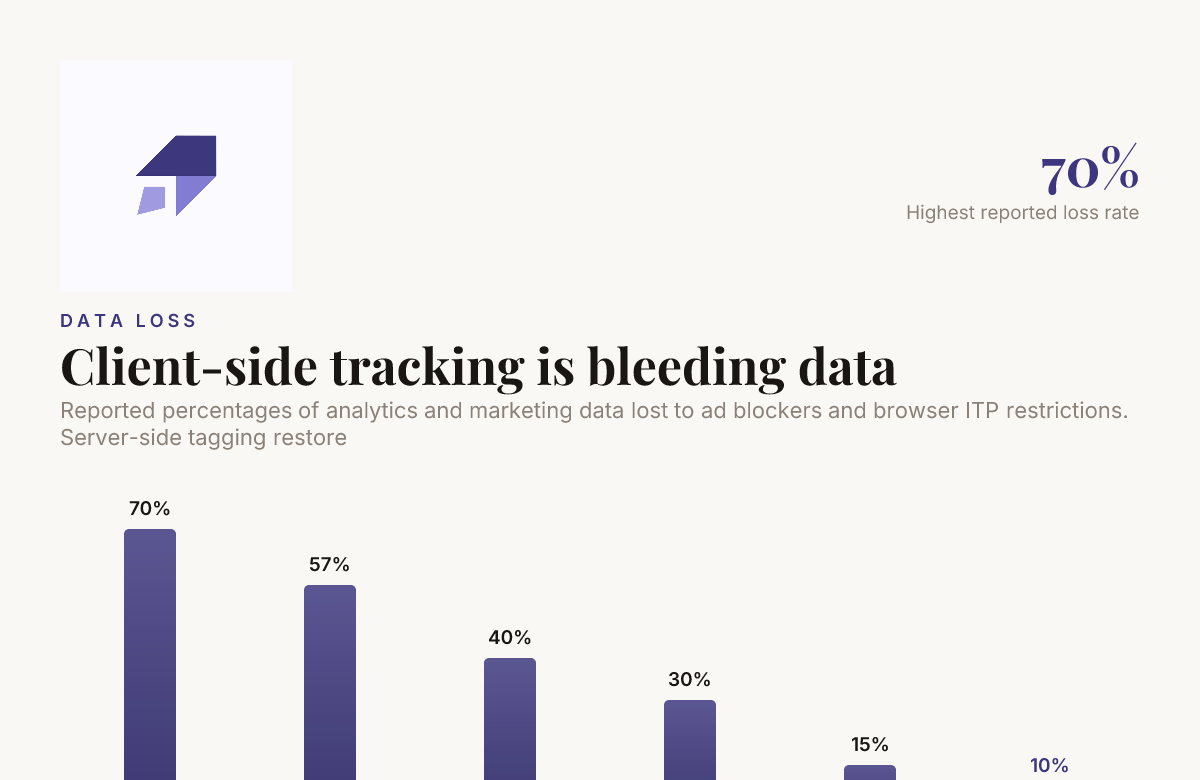
Reported percentages of analytics and marketing data lost to ad blockers and browser ITP restrictions. Server-side tagging restores this visibility.
This is not a weekend project, and anyone telling you otherwise hasn’t run one. Plan for four to eight weeks depending on how many tags you’re migrating and how complex your consent setup is.
Analysts on our digital web analytics team typically pair this rollout with a review of your existing dashboards, since your reporting layer often needs adjustment once cleaner data starts flowing in.
Conclusion
Server side tagging isn’t a magic fix, and we won’t pretend it is. But for teams losing real visibility to ad blockers, ITP cookie truncation, and bloated page load times, moving tags off the client and onto a server you control is one of the few technical changes that pays off in data accuracy, speed, and privacy control all at once.
Go in with clear eyes about the hosting cost, the engineering commitment, and the debugging learning curve. Run your parallel validation properly. And treat server-side Google Tag Manager as infrastructure, not a quick plugin install.
If you’re weighing whether server-side tagging fits your stack this year, we’re glad to walk through your specific setup and give you a straight answer, not a sales pitch. Reach out to our team and let’s start with an honest conversation about where your data is actually leaking.
Frequently Asked Questions
Is server-side tagging worth it in 2026?
For sites with meaningful ad spend, heavy third-party tag stacks, or high ad blocker usage, server-side tagging is usually worth the investment in 2026. For low-traffic sites with a lean tag setup, the hosting and maintenance cost may outweigh the benefit right now.
What is the difference between client-side vs server-side tracking?
Client-side vs server-side tracking comes down to where tags execute: in the visitor’s browser, or on a server you control. Server-side tracking routes data through one first-party tagging server, reducing exposure to ad blockers and browser cookie restrictions.
Does server-side tagging fix ad blocker problems completely?
No, but it significantly reduces the impact. Server-side tagging bypasses many browser-level blocking rules aimed at third-party scripts, though some ad blockers can still detect and block first-party requests to known tagging patterns.
How much does a tagging server cost to run?
Hosting a tagging server on something like Google Cloud Run typically costs a modest monthly fee that scales with traffic, but the bigger cost is usually the engineering time to set it up and maintain it correctly.
Can I use GA4 server-side without losing historical data?
Yes, GA4 server-side setups typically run parallel to your existing client-side GA4 tag during a validation period, so historical trends stay intact while you confirm the new data matches.
Does server side GTM help with GDPR or CCPA compliance?
Server side GTM gives you a single point to control and redact personal data before it reaches third parties, which supports compliance efforts, but it does not remove the need for proper consent management.
How long does cookie lifetime ITP restriction actually limit tracking?
Safari’s ITP can limit client-side, JavaScript-set first-party cookies to as little as seven days in some scenarios. Server-side tagging can extend that cookie lifetime up to three times longer since the cookie gets set from server response headers instead.

Founder of MarTech Stack. SEO, analytics and marketing automation.
LinkedIn