

A Power BI consultant is a specialist who helps turn business questions and data into useful reports, models and delivery plans. The right scope may be one focused dashboard or broader data and reporting work, depending on your decisions, data, users and ongoing responsibilities.
Key Takeaways
- A single dashboard fits when you can name the decision it supports, the people who will use it and the action they should take.
- Agreed KPIs and trusted sources keep a contained build practical. Inconsistent figures or scattered data can mean the model and integration need attention first.
- Scope the data as well as the visuals. Source access, data quality, refresh, security and deployment affect what the work involves.
- Prepare a clear brief with KPI definitions, owners, intended users and acceptance criteria before choosing an engagement shape.
- Compare consultants on their reasoning about data modelling, measures and validation, not just the appearance of their work samples.
- Plan for use after launch. Ownership, documentation, training and refresh monitoring help a report remain useful.
When one dashboard can meet the need
A single dashboard is a good fit when your team can describe one specific decision it needs to make and identify the people who will make it. That focus helps a Power BI consultant shape the reporting around a real business outcome, rather than a collection of loosely connected requests.
Keep the scope contained when the required KPIs have agreed definitions and rely on a small number of accessible, trusted sources. If your team already agrees what a measure means and where its data comes from, the work can concentrate on data modelling, reporting and adoption.
A dashboard is more than a set of visuals. Decide what users should be able to do with it, such as spot a change, investigate a result or choose where to act, then agree how you will judge whether it helps.
A contained build is less suitable when teams use conflicting definitions for the same KPI, need different access levels or expect a wider family of reports. Those needs point towards scoping shared data logic, governance and reporting requirements before settling on a single deliverable.
Common business intelligence use cases include monitoring operational performance, reviewing finance measures, understanding service demand and tracking marketing activity. The right starting point is the decision behind the reporting, not the department name or chart type.
When the data and reporting need scoping first
Scope data preparation before report design when important fields are missing, duplicated or inconsistent across systems. Visuals can make a number look authoritative, so the underlying data and business rules need to support it.
Ask how each source will be accessed, joined and refreshed. Separate databases, restricted permissions and manual steps can add data integration work beyond dashboard development.
Clarify whether you need a reusable semantic model. It gives measures and relationships a shared structure, allowing several reports to use the same business logic instead of recreating calculations in separate places.
Set out governance and access requirements early. Decide who can view or change data, which roles need different access and whether row-level security must restrict what each person sees.
Include deployment, refresh monitoring and maintenance when the report needs to remain reliable after launch. A useful implementation plan explains who owns the solution, how refreshes are checked and how the team will respond when something changes.
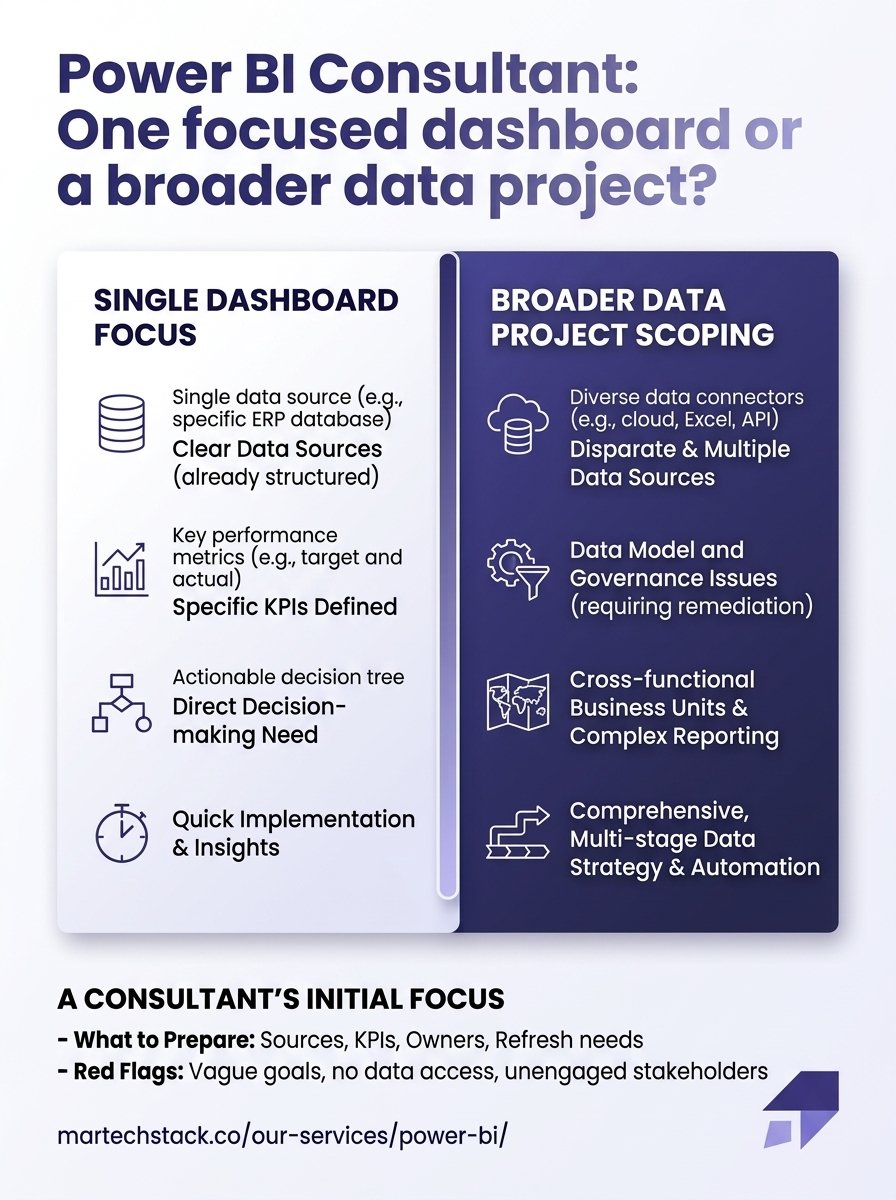
See how a Power BI consultant can approach a focused dashboard or a broader data project. The infographic highlights the difference between these two scopes.

Turn the business problem into a brief
Write down the decision the report should support, who will make it and what action they should take. This ties the requirements to a business outcome and gives the consultant a clear basis for discussing scope.
Be precise about what you mean by a dashboard. Teams may use the term for a single-page view, a multi-page report or a broader solution that includes a reusable semantic model; agreeing the deliverable prevents different expectations later.
For each KPI, record its business definition, calculation owner and relevant time period. These details help a Power BI consultant distinguish a genuine reporting requirement from a preference about how a result should look.
Agree acceptance criteria before work begins. For example, define which trusted figures the results must match, which filters must work and which questions the intended users should be able to answer.
Separate essential requirements from later enhancements. That keeps the first dashboard focused and gives your team a way to prioritise future work after users have tried the core solution.
Your brief should also name the stakeholders who can approve KPI definitions and resolve differences between teams. A clear decision-maker helps keep requirements moving when the project uncovers competing interpretations.
What to ask and prepare for the first session
A Power BI consultant should ask which decisions need support, who owns each KPI, what reports or processes exist today and where users struggle. These questions reveal whether the work is mainly report design or needs data preparation, integration or governance first.
Prepare a practical inventory of your data sources. For each one, note its owner, how the data is accessed and any known quality issues; this gives the discovery conversation something concrete to assess.
Bring sample data or existing reports where appropriate, along with KPI definitions, intended users, access requirements and security constraints. You do not need a polished specification, but real examples make it easier to identify gaps and assumptions.
Explain how often the data needs to refresh, when users need it and what should happen if a refresh fails. Those operating requirements influence the design as well as the support needed after handover.
Ask how the consultant will test the figures and agree acceptance, not only how the report will look. A sound answer should explain how data and calculations will be checked against agreed business definitions.
- Decisions and users: What needs to change or become easier, and who will act on the information?
- KPIs and ownership: Who defines each measure and resolves disagreement?
- Sources and access: Where does the data sit, and who can grant access?
- Refresh and security: How current must the information be, and who may see it?
- Success criteria: What evidence will show the report is ready to use?

Choose an engagement shape that matches the scope
Use a defined discovery-and-build engagement when the sources, KPIs and users are understood and the deliverable can be agreed in advance. A clear brief lets both sides set out the work, review points, handover and acceptance criteria.
Start with discovery or a data analysis assessment when source quality, integration, modelling or security requirements remain uncertain. Use the findings to define a build scope, rather than committing to report design before the foundations are understood.
Consider a team seeking a sales dashboard whose totals differ between its report and source system. First agree the sales definition and authoritative source, then trace the figure through transformations and measures before estimating a visual build. Once reconciled, test the result with the agreed filters and user permissions, and verify refresh in the intended environment. Acceptance should require the agreed totals to reconcile and access rules to work; if they do not, the remaining work is data or model correction, not a visual polish request. This makes dependencies and the build boundary visible before scope is fixed.
Ongoing support or internal training can suit teams that expect changing requirements, need help with adoption or want support maintaining refreshes after handover. Decide what the team wants to manage itself and where it needs continued assistance.
Custom Power BI can suit a project that needs clean views and tables built from business databases, with reports designed around business decisions. The service covers database work, SQL views and tables, custom reports and training, making it relevant when the dashboard needs data preparation as well as presentation.
Choose the people and structure around the scope. A focused build with clear requirements may suit an independent specialist; work spanning data integration, modelling, security and ongoing support may call for a team with those capabilities.
Do not treat a price estimate as meaningful without an agreed scope. Ask how the proposal accounts for source access, data preparation, modelling, security, deployment, training and support, and how it handles changes to requirements.
Compare proposals on the same scope: discovery, data preparation, modelling, reporting, deployment, training and support. Hourly pricing is flexible when discovery may change the task, but total spend is less predictable. Fixed-fee pricing gives clearer cost for agreed deliverables, while changes need a defined approval process. A retainer can suit ongoing support or iterative work if the covered work and priorities are explicit. Ask each consultant to state assumptions, exclusions, payment milestones and how extra work is approved and billed.
Compare consultants on more than polished visuals
Review relevant work samples for sound data modelling and clear reporting logic, not only attractive layouts. Ask what business question the work served and how its measures connect to the underlying data.
Test the consultant’s reasoning with practical questions. Ask how they would investigate an inconsistent source, define a measure in DAX or transform data in Power Query, then validate the result; their answer should be technically credible and understandable to your team.
Compare how candidates explain trade-offs, communicate uncertainty and involve business stakeholders. References can help you understand how they handled delivery, collaboration and changes in scope.
Be cautious if a proposal moves straight to designing visuals before discussing data, KPIs, access and acceptance criteria. That approach can leave the most important decisions unresolved until implementation is under way.
Look closely at what the proposal says about refresh reliability, security, documentation and ownership. If it focuses only on visuals, ask how the solution will be deployed and maintained after delivery.
When a report is slow, first isolate refresh from user interaction. Review refresh history and transformation steps, then use Power BI Performance Analyzer to identify visuals with slow queries; inspect their measures and model relationships before changing layout. Reproduce the issue with the same filters and user role, compare results with the trusted source, and repeat refresh in the intended environment. If capacity is relevant, check its metrics as well. Agree acceptance around reconciled figures, working access rules, and refresh and interaction meeting the team’s stated needs. A faster-looking page is not fixed if its KPI logic changes.
Agree handover and measure whether the work succeeded
Agree that handover will cover the data model, key measures, source connections, refresh process and any security configuration. This gives internal owners the information they need to maintain the solution.
Include documentation and knowledge transfer for the people who will manage or update the report. A Power BI implementation is not complete simply because users can open it; the team also needs to understand its logic and operating routine.
Measure outcomes against the brief. Check whether intended users access and trust the report, and whether it supports the decisions you named at the start.
Plan a review after users have worked with the report. Use their feedback and any unresolved questions to prioritise changes, rather than adding features without a clear need.

Frequently Asked Questions
Can an existing Power BI report be improved rather than rebuilt?
Yes. A consultant can assess the report, its model, transformations and refresh setup, then recommend which parts to retain or revise. Keeping a useful foundation can preserve established business logic while addressing the areas that need work.
Does every Power BI dashboard need DAX?
No. A straightforward report can use source fields and built-in aggregations, while DAX is useful for custom measures and calculations that respond to report context. The right choice depends on the business logic the report needs to express.
Do report viewers need a Power BI licence?
It depends on the sharing setup. Confirm the intended audience, access requirements and any licensing implications before deployment.
Can a small team maintain a Power BI dashboard without a dedicated BI team?
Yes, when the update routine is manageable and a named employee has time to look after it. Assigning a backup owner and keeping a short runbook can help the team maintain continuity when responsibilities change.
Conclusion
A single dashboard is enough when the decision, users, KPIs and trusted sources are clear, and the team can define what success looks like. When data quality, integration, security or shared reporting needs remain uncertain, scope those foundations before committing to a build.
Choose a Power BI consultant who asks about the business outcome, explains the data work and plans for handover. With a clear brief and a scope matched to your needs, your team can build reporting people trust and use.

Founder of MarTech Stack. SEO, analytics and marketing automation.
LinkedIn