

Power BI often fits Microsoft-centred teams and shared business reporting; Tableau often suits teams that prioritise flexible visual exploration. Neither is right for every organisation: compare learning needs, licensing, data workflows and governance on the same real workload.
Key Takeaways
- Best starting point: Map who builds, maintains and uses your reports before comparing tools.
- For Microsoft-centred teams: Power BI is a natural candidate when Microsoft 365, Excel or Azure already shape everyday work.
- For visual exploration: Tableau is often chosen for flexible visual analysis, while Power BI can support interactive business dashboards.
- For reliable metrics: Agree where business logic lives and assign owners to important measures before scaling self-service analytics.
- For a fair comparison: Test both tools on the same data, reporting question, refresh schedule and user tasks.
- For a migration: Include models, calculations, permissions and report maintenance in the plan, not just dashboard redesign.
Start with the decisions your reporting must support
Before choosing between Power BI and Tableau, map the people involved. Analysts may need room to investigate data, while occasional business users need clear reports they can understand and use without specialist help.
Next, separate recurring KPI reporting from exploratory analysis. Recurring reports benefit from stable definitions and consistent presentation; exploratory work needs space to examine segments, test questions and build a visual story.
Then follow the whole reporting workflow: source data, preparation, modelling, visualisation, access and distribution. A compelling chart cannot make up for unclear metrics, unreliable inputs or a report that never reaches the people making the decision.
That workflow gives your power bi vs tableau comparison a practical foundation. For more guidance on turning marketing data into decisions, explore our Data & Attribution articles.
Compare visualisation and dashboard usability in context
Power BI vs Tableau is easiest to assess when both tools answer the same real marketing question using the same dataset. Tableau is often selected for flexible visual exploration; Power BI offers a capable range of interactive business dashboards.
| What to assess | Power BI | Tableau | Practical test |
|---|---|---|---|
| Visual analysis | Test interactive dashboards against the team’s reporting needs. | Test how analysts explore and present visual findings. | Ask users to investigate the same question and explain what they found. |
| Audience usability | Check whether business users can reach useful detail from a summary. | Check whether visual exploration stays understandable for its audience. | Give a KPI task to both an analyst and an occasional report user. |
| Dashboard quality | Review labels, contrast, navigation and screen behaviour. | Review the same accessibility and maintenance requirements. | Test with real viewers, not just the report author. |
Make sure users can move from a headline KPI to a relevant segment or detail without losing context. Interaction should clarify a decision, not add visual complexity for its own sake.
Include colour contrast, readable labels, keyboard navigation and behaviour across screen sizes in your review. These details help keep dashboards useful for more people as audiences and reporting needs change.
When decisions need to shape the dashboard, Custom Power BI Dashboards bring together clean SQL views and tables with reports designed around business decisions. That makes this service relevant when teams want the reporting workflow to start with the decisions, not with chart selection.

Match team skills to the Microsoft and wider data stack
Power BI is a natural candidate for teams already working in Microsoft 365, Excel or Azure. Familiar tools and workflows can reduce friction, especially when business users already handle spreadsheets and analysts need to build shared reporting.
For either platform, test the data connectors and authentication patterns your team actually needs. Include Salesforce and relevant marketing platforms in that check; a long connector list does not tell you whether your chosen sources will work smoothly with your organisation’s access setup.
Tableau’s relationship with Salesforce can matter when CRM data and workflows are central, but ownership alone does not guarantee the right connector behaviour, authentication, refresh options or user entitlements. Power BI can also connect to Salesforce. Test the exact objects, permissions and refresh needs in your intended setup, especially if reports combine CRM data with other sources; choose based on that workflow, not ownership alone.
The skills are different, too. Power BI modelling commonly involves Power Query for data preparation and DAX for calculations; Tableau users need to learn its own data preparation, calculation and visual-analysis workflows.
For someone new to business intelligence, the first tool to learn is often the one used by their team or target workplace. Familiarity with Excel can make Power BI a more comfortable starting point for some learners, but both platforms require practice with data logic as well as visual design.
A short, representative task will show how quickly report authors and business users can create, understand and maintain useful outputs. Custom Power BI takes clients’ databases to dashboards people use, making it a relevant example when your reporting work needs to connect existing data with everyday business use.
Evaluate data preparation, modelling and shared metrics
Choose where transformations and business logic should live. Reusable SQL views or a governed warehouse model can reduce duplicated calculations across dashboards and give teams a clearer place to maintain shared definitions.
In Power BI, test how Power Query preparation, relationships and DAX measures support the reporting model you need. In Tableau, test its data model and calculations against the same questions, rather than comparing modelling approaches in the abstract. For a concrete check, compare date-aware revenue totals and distinct-customer counts under changing date and segment filters, and see whether each calculation can be reused across reports.
For a dependable semantic layer, define each important metric once, assign an owner and document what it means. That gives teams a common reference for measures such as conversion rate and helps prevent separate dashboards from presenting competing definitions.
Test realistic joins, date logic and segmentation before creating a large set of reports. If the underlying model handles customer, campaign or time relationships incorrectly, every visual built on it can inherit the same error.
One example on the Projects page is funnel data-quality monitoring using Power BI.

Check governance, sharing and deployment at team scale
Compare how each platform can meet your requirements for role-based access, row-level security, workspace or project permissions and controlled distribution. Test the configuration with real user roles and data, because a permission design must work in practice, not only on a diagram.
Give someone clear ownership of datasets, metric definitions, access requests and dashboard maintenance. Self-service analytics works best when users can identify which reports and measures are authoritative and know where to ask for changes.
Test performance using the workload you expect: data size, refresh pattern, concurrent viewers and live-query requirements. There is no universal speed advantage to assume; the result depends on how your sources, model, deployment and report design work together.
Make accessibility and maintenance part of data governance. Review reports when audiences, definitions or source systems change, and retire views that no longer support a decision.
Power BI projects on the Projects page also include automated per-customer reporting.
Compare total cost and plan any migration carefully
Compare current licensing and deployment options against the actual mix of report authors, analysts and viewers. Prices change and should be checked against the current plans, using the roles and sharing model your organisation intends to operate.
For Power BI, compare user-based licenses with capacity-based deployment, and verify the sharing rights and capacity requirements for your intended audience. For Tableau, map authors and viewers to Creator, Explorer and Viewer roles, then compare the current costs for those roles under the Cloud or Server deployment you plan to use. If a small author group serves a broad audience, viewer entitlements and capacity can matter as much as author licensing.
Licence fees are only one part of total cost of ownership. Include administration, infrastructure, training, data preparation, deployment, support and the ongoing effort to maintain reports; a low entry cost may not reflect the work required to run a trusted reporting service.
Before a migration, inventory reports, calculations, data models, permissions and dependencies. Identify which assets people rely on and which would take significant effort to rebuild, then pilot a representative group rather than moving everything at once.
Recreate and validate metric definitions and access controls alongside the dashboards. Visual similarity alone does not preserve the original logic or governance, so check that the new outputs answer the same questions for the right users.
A further example on the Projects page is migration of company, customer and partner reporting from QuickSight to Power BI.
Use a workload-based decision framework
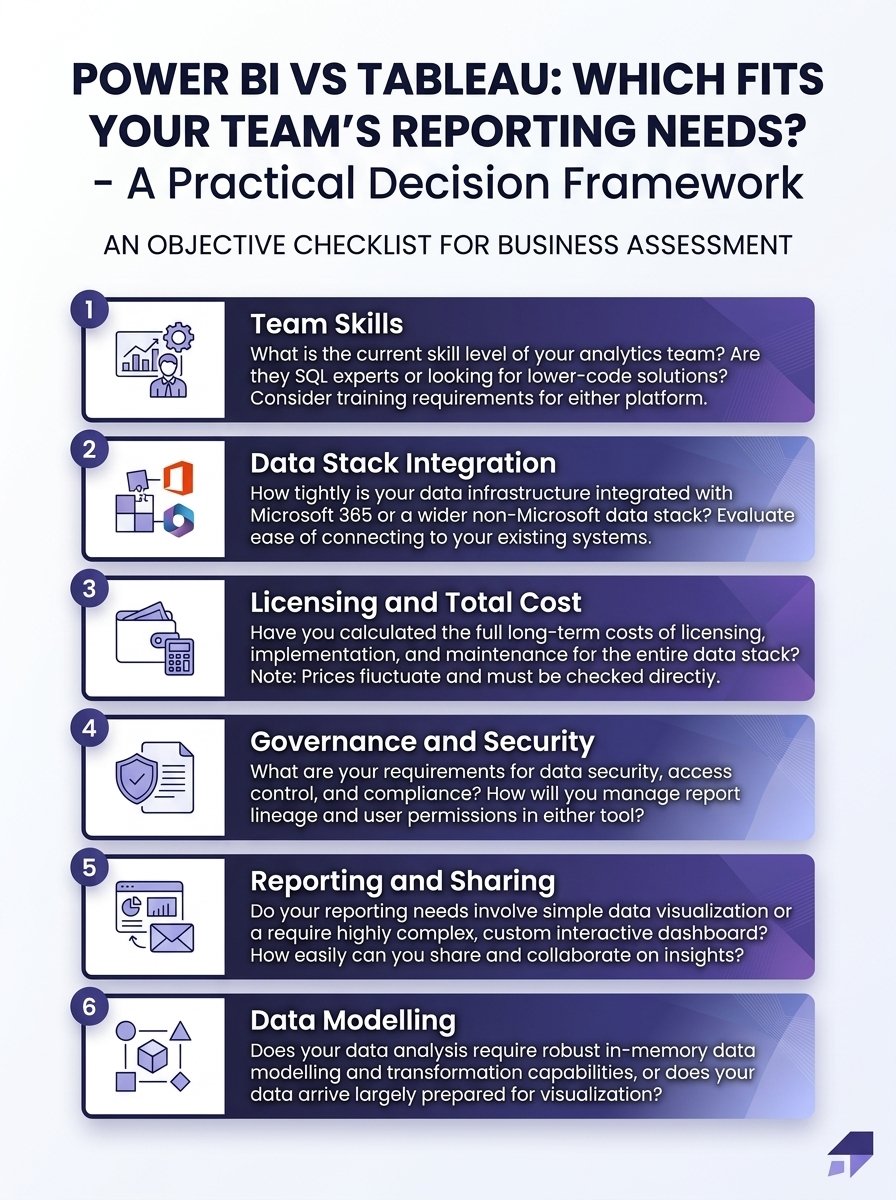
Use the following criteria to turn your Power BI vs Tableau comparison into a practical decision. The aim is to choose the platform that fits your data environment and operating model, then set a roadmap for consistent reporting.
- Lean towards Power BI when Microsoft integration, shared business reporting and existing Power Query or DAX skills are central to the work.
- Lean towards Tableau when flexible visual exploration is a priority and analysts are ready to build and maintain its data and calculation workflows.
- Run a representative pilot. Use real datasets, refresh schedules, concurrency and live-query needs, then measure usability and performance against agreed requirements.
- Assess advanced analytics by task. Check whether AI or other capabilities improve a specific decision or workflow, and whether your data readiness, governance and user skills support their use.
- Set shared ownership. Assign responsibility for key metrics and agree how reporting will be reviewed as the organisation’s needs evolve.
Make the pilot useful to more than the report author. Ask analysts to create and maintain a report, then ask business users to answer realistic questions from it; this reveals where the learning curve or workflow needs attention.

Frequently Asked Questions
Can an organisation use Power BI and Tableau together?
Yes. A team can keep one platform for established reporting and use the other for a distinct analysis need, provided it defines which tool owns each report and metric. A shared data model and clear access rules can help prevent duplicate dashboards from creating conflicting answers.
Which tool should someone learn first for a data analytics career?
Start with the platform used in the roles or organisations you are targeting, then build transferable skills in SQL, data modelling and explaining findings. Learning how to validate a measure and communicate its meaning will serve you beyond either product.
What should be documented before a dashboard’s owner leaves the team?
Record the report’s purpose, metric definitions, source tables, transformation steps, refresh process, filters, access rules and business contacts. Include the deployment or workspace location and explain any scheduled dependencies so another owner can take over the full reporting workflow.
How can a team validate an AI-generated insight before acting on it?
Trace the insight back to the underlying data and reproduce its calculation independently. Then test whether the result holds across relevant time periods or customer groups, and ask a subject-matter expert to check that the interpretation fits the business context.
What should European teams include in a BI data protection review?
Map which personal data fields appear in reports, who needs access and how long the information must remain available. Involve privacy and security owners to review data minimisation, access controls and deployment arrangements against the organisation’s obligations.
Is Power BI or Tableau harder to learn?
No tool is universally harder. Power BI may feel more approachable at the start for people familiar with Excel, but reliable reporting calls for practice with Power Query, relationships and DAX, including filter context. Tableau can feel intuitive for visual exploration, while its calculations, data structure and dashboard workflows also take practice. Compare the work your team actually needs: build a KPI view, change its date range or segment, then check where the calculation lives and who can maintain it. The harder fit is often the one that clashes with existing skills and reporting workflows.
Can you learn Power BI quickly?
A focused beginner can learn the interface, connect and shape data, and build a simple report in a short learning sprint. That is not the same as job-ready proficiency: dependable relationships, DAX context, refresh, access and troubleshooting take practice on realistic data. Treat a quick start as a basic-report milestone, not proof that a model is ready for production.
Do more people use Tableau or Power BI?
Power BI is generally more widely encountered in Microsoft-centred workplaces, while Tableau has an established user base, especially where visual analysis is a priority. A clean global comparison of active users is difficult because licensed seats, deployed users and active usage are not the same measure. For choosing a tool or deciding what to learn, check which platform is standard in your target workplaces and data environment; local adoption matters more to your opportunities and support than a headline total.
Conclusion
The right choice in Power BI vs Tableau comes from fit, not a universal winner. Match the platform to your team’s skills, Microsoft and wider data stack, modelling approach, governance requirements and reporting workload.
Test both tools on real work, compare total cost of ownership and give shared metrics clear owners. That practical roadmap helps your team make a data-driven decision and keep reporting useful as needs change.

Founder of MarTech Stack. SEO, analytics and marketing automation.
LinkedIn